 Contact Us
 Schedule Demo
Bring the operation together
Consult ongoing vehicles and routes in a centralized view, without relying on individual phone updates.

Optimize routes based on capacity, urgency and delivery area.
View the status of deliveries by customer and team in real time.
Photos, digital signature, password and much more.
Connect your system via API or receive events via Webhooks.
Monitor, pause or redirect deliveries in real time.
Complete control of deliveries directly on the delivery person's cell phone.
Send SMS, WhatsApp or email to the customer when the delivery is on its way or completed.
Discover the evolution of planning packaging and visualizing cargo in 3D.
Control Tower
Routes, delivery people and orders on the same panel. Monitor the progress of deliveries, identify delays and understand occurrences to guide your team.
Explore an example operation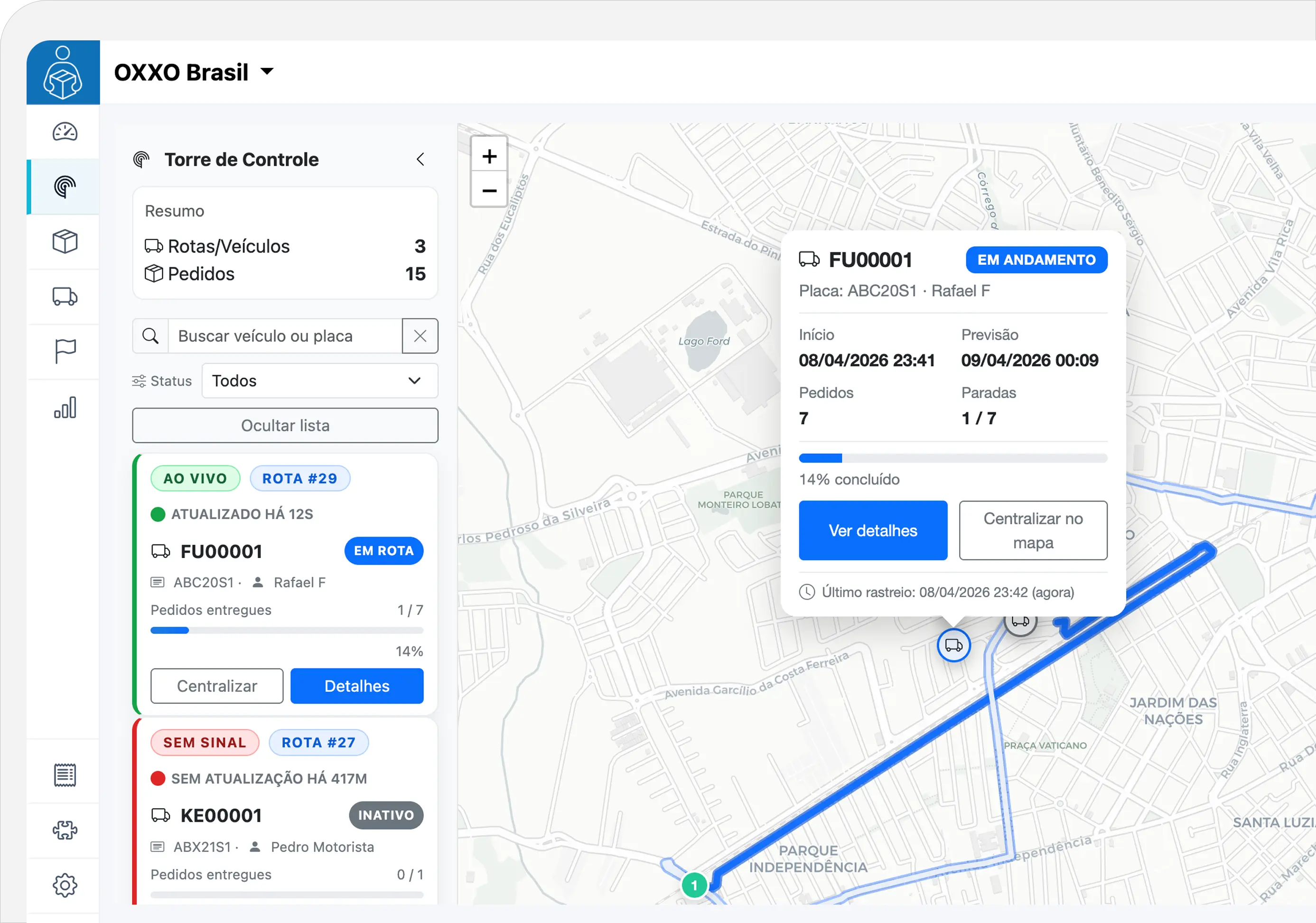
From overview to detail
When multiple routes happen at the same time, your team needs to understand the progress and recognize situations that require attention.
Consult ongoing vehicles and routes in a centralized view, without relying on individual phone updates.
Check late stops, undelivered orders and the time since the last position received from the delivery person.
See the route, stop and orders involved to talk to the delivery person and give a clearer answer to the customer.
Experience management's vision
Explore each route to understand progress, location updates, and what's worth checking out.
OPERATION ROUTES
The route has 4 of 8 orders delivered. The last position arrived at 2:29 pm, one minute before the time in this example.
Consult the next stop and linked orders to guide service.
Information that helps coordinate
Open the details to understand what happens on each route and monitor the execution of deliveries.
View the planning lines and the recorded route, according to the positions received during the route.
Locate a vehicle by name or license plate. Use the status and overdue filters to direct your query.
Consult the next stop, completed steps and linked orders, with access to operation details.
Recognize overdue turnarounds and undelivered orders without confusing a completed turnaround with a successful delivery.
Check the last location update and battery level, when reported by the app.
Access WhatsApp when a phone is available and align the situation with whoever is taking the route.
A flow for everyday life
A common reference for managing deliveries and service.
View ongoing routes and look for the vehicle or situation your team needs to track.
Check progress, next stop, predictions and events before defining the next step.
Contact the driver and access the route or order details to conduct the service.
Before you start
Understand how information reaches the Tower and helps with monitoring.
The Tower is aimed at the team that coordinates the operation: it brings together vehicles, routes and stop details. The tracking link allows the recipient to track their order information.
The delivery person's application sends the cell phone's positions. The update depends on location permissions, connection and data sending by the app.
The last received position and update indication help identify missing recent data. An old position does not confirm where the vehicle is now; the team can check the situation with the delivery person.
Stops that have not yet been completed can be signaled when they exceed the recorded forecast. Forecasts are estimates and must be evaluated together with the progress and information of the operation.
Not necessarily. The Tower allows you to consult stop orders and highlights undelivered orders. This helps separate route progress from the outcome of each delivery.
Your operation, with more visibility
Discover the Control Tower and see how to monitor your team and their deliveries on a single panel.